
A task on a Scrum board says "Add search to the transactions screen." The developer moves it to Done. The reviewer opens it and finds no search bar. What happened? The task was too vague. The person who moved it thought they had done enough, but "enough" meant different things to different people.
Task checklists can make overlooked steps visible. They turn a short title into specific actions and checks. A tick records that someone believes a step is complete; the team still needs evidence that the result works and meets its Definition of Done.
This article will teach you how to write good task checklists, when to use them instead of subtasks, and how to avoid common pitfalls. We'll use a screenshot of the fictional Northwind Mobile Banking demo to make the distinction concrete.
What Is a Task Checklist?
A task checklist is a list of items attached to a single task. Each item describes one concrete action or outcome that must happen before the task can be considered Done.
In AllScrum, you open a task and choose "Add checklist item" below the description. You can add, rename, complete, reopen and remove items. Up to 100 items per task. The checklist progress—completed versus total—shows on the task card on the board, in list views, and on My tasks.
The key difference between a checklist and a description: the description says what the task is. The checklist says exactly what steps prove it's done.
Checklist vs Acceptance Criteria vs Definition of Done
Teams often confuse these three things. Here's the distinction:
- Definition of Done: A team-wide agreement that applies to every task. Things like "code is peer reviewed," "tests pass on CI," "deployed to staging." These don't go on every task checklist; they're assumed.
- Acceptance criteria: Conditions the task must satisfy for the product owner to accept it. Often phrased as "Given... When... Then..." They belong in the task description or a linked document.
- Task checklist: Task-specific steps that the person doing the work must complete. These are short, verb-led, and observable. They answer "What do I need to physically do or verify before I click Done?"
Good checklist items use action verbs: "Add screen reader label to dashboard filter," not "Accessibility done." They state an observable outcome: "Verify focus order on a phone," not "Check accessibility."
A checked box does not prove a working outcome. The step should be something you can see, hear, or test. A step can require another person's input and still belong on a checklist; choose its form by what it describes, not by who verifies it.
When to Use Checklists vs Subtasks
Checklists are for steps within one responsibility. Everyone who reads the checklist knows roughly how to do each item. If an item would take a different person or a separate estimate, that's a subtask.
For example, "Add screen reader labels to the dashboard" might have checklist items like "Label the account summary widget" and "Label the navigation bar." One developer does both. That's a checklist.
But "Choose participants and their shares" and "Show each participant the amount owed" are two different concerns. The demo does not specify how these pieces will be implemented. Their separate task records allow independent ownership and estimation if the team needs them. That's a subtask.
Save checklists for steps the same person can do without changing context. Save subtasks for work that needs independent ownership, estimation, or tracking.
How to Write Great Task Checklist Items
Follow these rules when writing checklist items:
- Start with a verb. "Add," "Verify," "Update," "Remove," "Extract," "Refactor." Avoid vague words like "Handle," "Do," or "Work on."
- Make it observable. You should be able to tick the box as soon as you check one thing. If you have to read a whole page to decide, it's too big.
- Limit to one action per item. "Add labels and update tests" is two items. Split them.
- Keep the list short. The whole list should fit on one screen. If you need more than 10 items, the task is probably too broad. Split it into smaller tasks.
- Include verification steps. "Test on a phone" is valid. "Make sure it works" is not.
- Write for the person doing the work. Don't write a list that only the product owner understands.
Worked Example: NMB-9 "Screen Reader Labels on the Dashboard"
The Northwind Mobile Banking team is running Sprint 14. Their goal: "Customers can sign up and send their first instant payment." The sprint has 8 tasks.
One of their tasks is NMB-9, "Screen reader labels on the dashboard." It's part of the Accessibility audit epic, which is still in the planned state. The task sits in Backlog.
The task has a checklist with three items:
- Inventory dashboard controls (completed)
- Add meaningful screen reader labels (open)
- Check focus order on a phone (open)
The checklist shows 1/3 complete, and the task remains in Backlog.
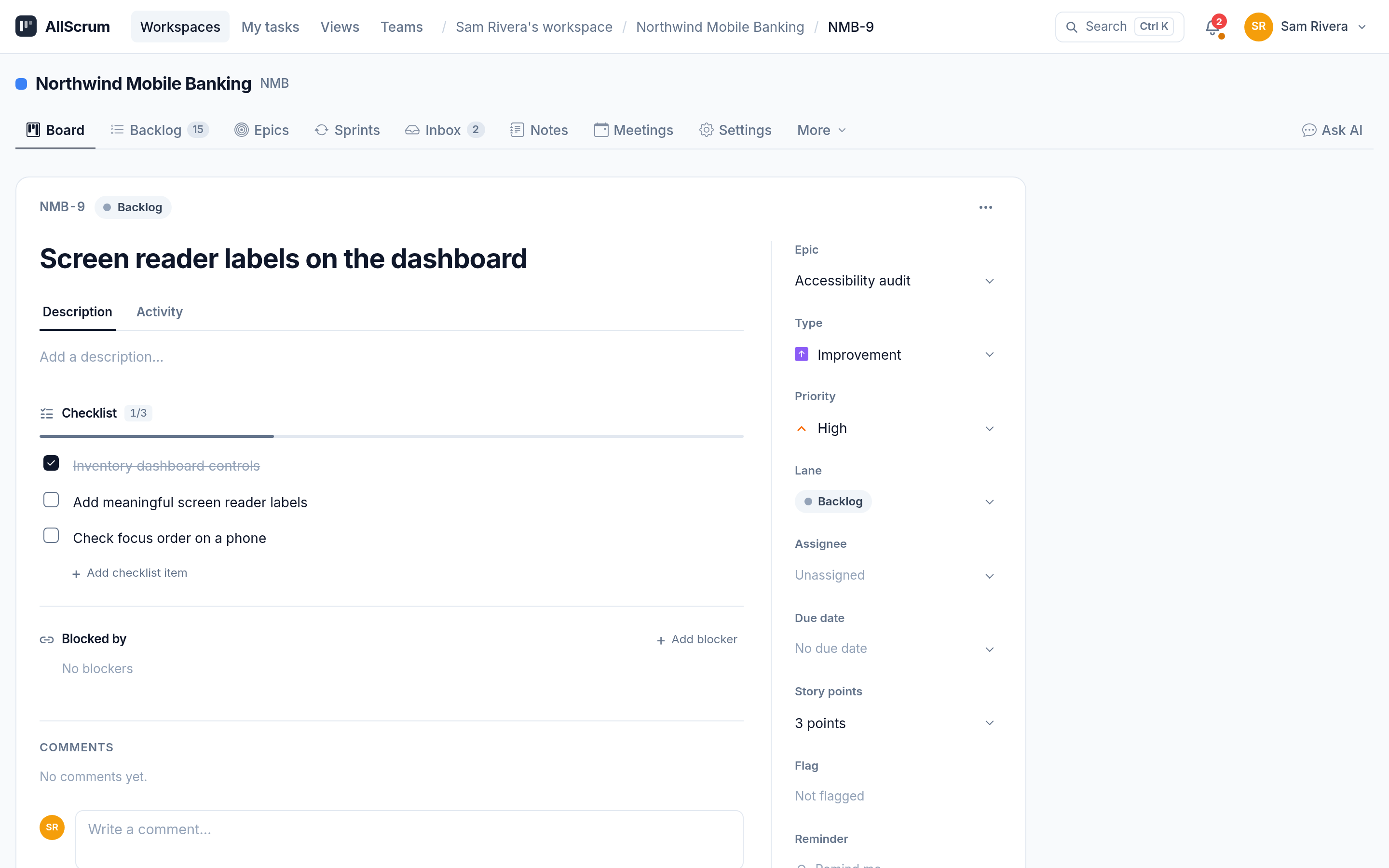
The checklist tells you what remains to inspect. The 1/3 does not imply effort or progress in story points. It only tells the team what steps are left.
Common Mistakes with Checklists
Mistake 1: Writing vague items
"Improve performance" is not a checklist item. "Measure query time on the user list endpoint and verify it's under 200ms" is. The first one can never be checked off. The second one can.
Mistake 2: Making the list too long
A checklist with 30 items is not a checklist. It's a plan. Break the task into smaller tasks. Each task should have at most 10 checklist items. If you need more, the scope is too broad.
Mistake 3: Including items that belong elsewhere
"Code review completed" is a Definition of Done item. Don't put it on every task checklist. "Acceptance criteria: user sees a success message" is acceptance criteria. Put it in the description.
Mistake 4: Never reopening a checked item
A checklist item is not final until the task is Done. If a review reveals the step wasn't done correctly, reopen the item. In a connected session, uncheck the item so its open state is visible again. Don't create a new task for a step you already planned.
Mistake 5: Reviewing the checklist instead of the outcome
The goal is a working task. The checklist is a path, not the destination. Before moving the task to Done, verify the outcome, not just the checkboxes. If you only confirm that the boxes are ticked, you might miss whether the actual work works.
Reviewing Completed Checklists
When someone moves a task to Done, the reviewer should open the task and look at the checklist. Not to count ticks, but to verify that each item's outcome is real.
For example, if "Check focus order on a phone" is ticked, ask: "Can I see a screenshot of the focus order? Which phone did you test on? What was the sequence?"
If the developer can't answer these questions, reopen the item and ask them to verify again. Don't block the whole task unless the item is critical. Use your judgment.
The checklist is also useful during the sprint review. When the team demonstrates the task, they can walk through each checklist item to show they didn't miss anything. This builds trust with the product owner and stakeholders.
How AllScrum Makes Checklists Easy in Practice
In AllScrum, checklists are built into every task. You don't need a separate tool or plugin. Open a task, add items, and the progress shows on the board card. List views and My tasks also show the completed/total numbers.
Checklist changes require a connection. Checklist edits cannot be queued offline: reconnect before adding or changing an item. Some task and comment edits support offline saving, but that does not extend to checklist controls. Plan for this if your team works in areas with poor connectivity.
A Quick Checklist for Your Next Task
Before you close this article, here's a short checklist for writing checklists:
If you answered yes to all six, your checklist is ready.
Recommended Workflow for Your Team
- During sprint planning: For each task with ambiguous completion criteria, ask the team to write checklist items together. Don't leave it to the assignee alone.
- During the sprint: The assignee works through the list, checking items as they go. If they find a missing step, add it then.
- Before moving to Review: The assignee verifies each checklist item's outcome, not just the checkbox.
- During review: The reviewer opens the task and asks one question: "What proves this item is done?" If the answer is a screenshot, test result, or live demo, accept it. If the answer is "I checked it," ask for evidence.
- At the sprint review: Walk through checklist items to demonstrate completeness. This is especially useful for infrastructure or refactoring tasks that don't have a visible result.
- If a checklist item fails: Reopen it. Don't create a new task for a step you already planned.
Why This Matters for Smaller Teams
On teams of 3–15 people, everyone wears multiple hats. A developer might write code, test it, write docs, and deploy it. Checklists keep the single-person flow straight. The same person who opened the task might come back to it three days later. A checklist tells them exactly where they left off.
Checklists also reduce the "almost done" trap. Without a checklist, a task might sit in "In Progress" for days while the assignee remembers what else needs to happen. With a checklist, they tick items as they go. When the last item is checked, they can review the outcome against acceptance criteria and the Definition of Done before moving the task.
Try It in Your Next Sprint
Next sprint, for every task that has more than one clear step, add a checklist before assigning it. Keep each item short and observable. See if it reduces the number of tasks that come back from review.
Ready to put this into practice? AllScrum makes task checklists simple, with progress visible on every card. Get started free at allscrum.com.