
You're looking at a task that's too big for one person. The checklist is long, the estimate is chunky, and you know it needs to go to two different people. Should you turn it into more checklist items, or split it into subtasks?
Many teams default to checklists because they're simple. But checklist items do not have separate assignees. When each piece needs its own assignee, its own lane movement, or its own estimate, you need subtasks.
Here's how to know when to split, how to set it up, and—most importantly—how to keep your estimates honest.
What Makes Something a Subtask
A subtask is a full task with a parent. It has its own key (like SPL-12), its own assignee, its own story points, its own comments, its own checklist, and it moves through lanes independently. The only thing that links it to the parent is the parent-child relationship.
This is different from a checklist item. A checklist item is a small step inside one task. It has no separate owner, no separate estimate, and it lives or dies with the parent. Checklist items are great for "write tests for the login module" where one person does all the steps. They're wrong for "build the login module and the signup module" where two people need to work at the same time.
The Key Insight
Subtasks let you split ownership without splitting the story. The parent continues to represent a single outcome, but the work to get there is distributed across multiple people.
When to Use Subtasks Instead of Checklists
The line between a checklist item and a subtask is simple: does this piece need its own owner, its own estimate, or its own lane movement?
Use a checklist when:
- One person will do all the steps
- The steps are small and sequential
- You don't need to track progress of individual parts
- The whole thing fits in one sprint
Use a subtask when:
- Different people need to own different parts
- Each part needs its own estimate
- Parts might finish at different times and move through review separately
- You want to track sub-progress independently
A helpful rule: if you want to assign individual steps to different people and track them separately, consider subtasks.
The AllScrum Way: Optional, Clean, One Level Deep
AllScrum keeps subtasks as an optional feature because not every project needs them. Subtasks are turned on per project in Project settings → Workflow by enabling Use subtasks. The switch only changes what the app shows. Turning the switch off does not delete existing parent-child relationships, and tasks that already have them still show them.
The Rules Are Simple
- One level deep. A subtask can't have its own subtask, and a task with subtasks can't become a subtask. This keeps the structure flat and readable.
- Same project. No cross-project subtasks.
- Up to 100 subtasks per task. That's plenty for any real-world split.
- Subtasks are full tasks. They live in any lane and move independently. A new subtask goes on top of the backlog when the parent is in the backlog, otherwise into the board's first lane.
What Happens to Estimates
Here's the part that trips teams up: the parent's points stay the parent's points. AllScrum does not roll up subtask points to the parent, and the parent's status stays its own.
No roll-up does not mean automatic deduplication. If a parent has 5 points and each of two children has 3 points, a total containing all three tasks counts 11 points. If those estimates describe the same work at two levels, that total overstates it. Story points estimate relative work; they do not measure customer value.
Choose one estimation level for the same scope. One convention is to estimate the parent and leave its children unestimated. Another is to estimate the children and leave the parent unestimated, ensuring integration and verification are covered in those estimates. These are team conventions, not rules enforced by the application. Review the convention whenever the structure changes.
Worked Example: NMB-13 on Northwind Mobile Banking
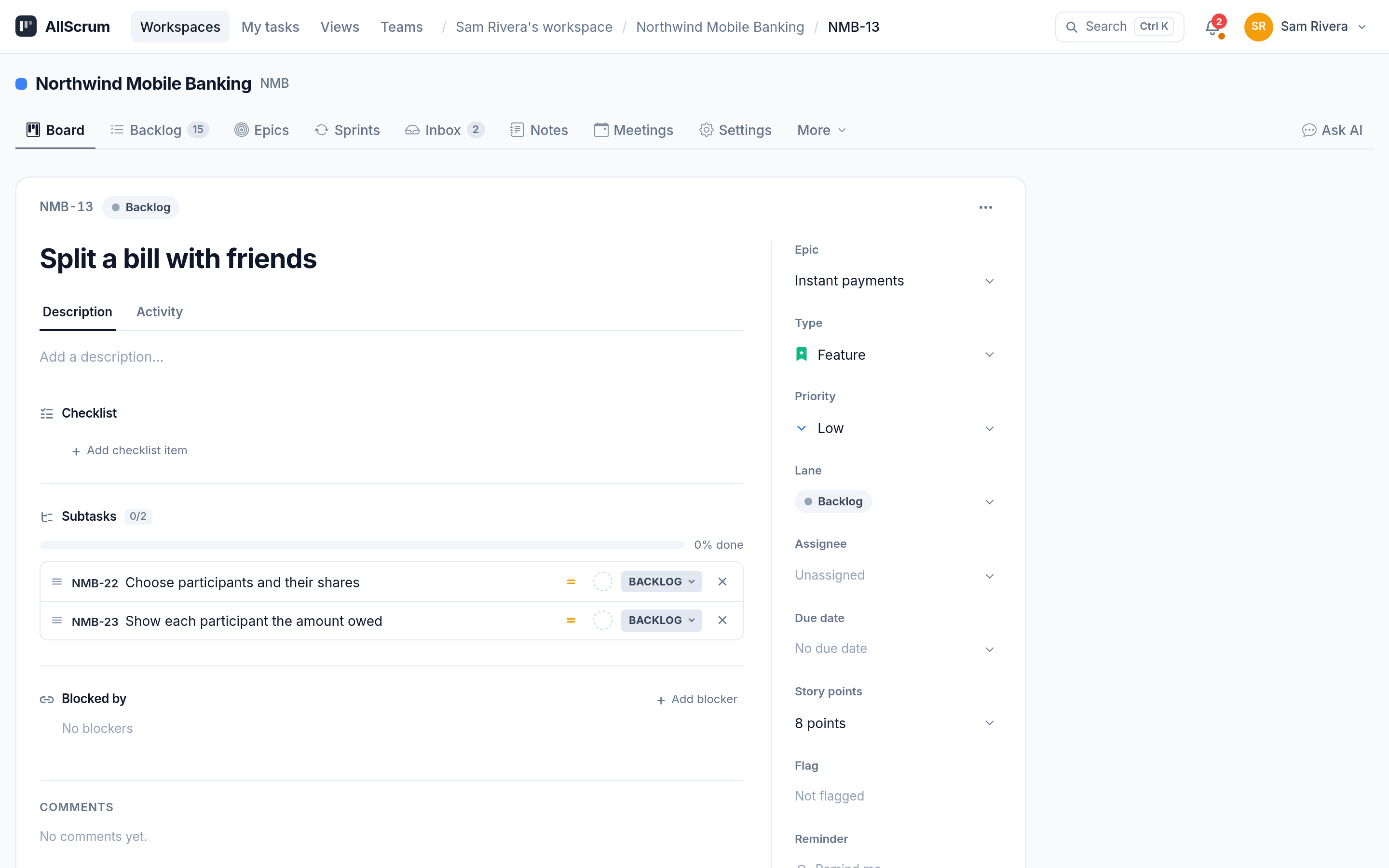
The Northwind Mobile Banking team is building a mobile banking app. They have a backlog item that demonstrates exactly when subtasks beat checklists.
NMB-13: Split a bill with friends
- 8 story points
- In the backlog
- Two subtasks: "Choose participants and their shares" and "Show each participant the amount owed"
What does this split make possible?
The two task records allow separate ownership and tracking if the team needs it; the screenshot does not record a reason for the split. Each subtask could move through the board on its own schedule—one might finish review while the other is still in progress.
The parent has 8 points and the subtasks are unestimated in this snapshot. That is consistent with keeping the estimate at the parent level. It does not establish that the children will later receive estimates, nor does it define a universal meaning for 8 points. The 0/2 indicator counts completed children, not effort or customer value.
A suggested convention for this example: retain the 8-point parent estimate and leave both children unestimated while using their lanes to track the pieces. If the team instead wants estimates on the children, revisit the parent's estimate deliberately. Count the same scope once, and verify the point total before starting a sprint.
Boundaries: What Subtasks Are Not
Subtasks are easy to overuse. Here are the boundaries that keep them useful.
Not a Replacement for Epics
Epics group goals across multiple tasks. Subtasks split one task into owned pieces. If you're thinking "the onboarding redesign needs tasks for the flow builder, the validation engine, and the analytics dashboard," that's an epic, not subtasks. Epics live at a higher level and group independent tasks that each have their own outcome.
Not a Tool for Dependencies
A subtask is not a blocker or a dependency. If subtask A must complete before subtask B can start, the parent should be split differently, or the dependency should be explicit as a blocker. Subtasks can move independently through lanes, so a dependency between them is a sign that your split isn't clean.
No Double-Counting
AllScrum leaves the parent's points and status independent of its children. Your team must prevent overlapping estimates through an explicit convention; the absence of a roll-up does not do that for you.
Common Mistakes Teams Make
1. Subtasking Everything
When every task gets two or three subtasks "just in case," you add overhead without benefit. Reserve subtasks for the cases where ownership or estimation truly needs to split. Most tasks should stay as simple tasks with checklists.
2. Estimating the Same Scope Twice
Discuss the whole outcome before choosing where to estimate. A task breakdown can reveal missing integration or verification work, but it does not justify keeping overlapping estimates at both levels. Record the chosen convention so a later assignee does not accidentally reintroduce double counting.
3. Using Subtasks for Sequential Work
If the subtasks form a pipeline—first do A, then B, then C—and only one person works on them at a time, a checklist is simpler and clearer. Subtasks add independent ownership, but if you don't need independence, keep it flat.
4. Deleting the Parent
If a parent is no longer needed, deleting it keeps the subtasks as standalone tasks. This is the right behavior: the work has independent value even if the larger outcome isn't pursued. Just make sure the team knows the subtasks are now separate.
When Things Change
A subtask is not permanent. You can:
- Make a subtask standalone again (it keeps its history)
- Change a task's parent (it moves under a different outcome)
- Turn a checklist item into a subtask (when you realize a step needs its own owner)
All of these are normal edits with undo support in the project history. Changing the parent is a normal task edit: it appears in the history with undo available.
Checklist: Should You Use Subtasks?
Before splitting a task into subtasks, run through this list.
Independent ownership or movement can be enough to justify a subtask; there is no voting threshold. Choose the smallest structure that makes responsibility and completion clear, then check how its estimates will be counted.
Try It in AllScrum
Subtask management is built into AllScrum for teams that need it, and stays out of the way for teams that don't. Each subtask gets its own key, assignee and lane movement, with an optional independent estimate. Choose one level for estimating shared scope so totals remain clear. Start with a free account at allscrum.com and see how clean ownership feels when every task is owned by exactly one person.