
A backlog full of unordered tasks is a planning meeting killer. When nothing is ranked, every item requires a fresh discussion about priority, and you run out of time before you've filled the sprint.
It doesn't have to be like that. When the backlog is already ranked, sprint planning becomes straightforward: you take capacity, check the top of the backlog, and pull in what fits. The meeting shifts from arguing about what to do to agreeing on how to do it.
Here's how to set yourself up for a smooth sprint planning session using a ranked backlog.
Why a ranked backlog matters
A ranked backlog—where the most important, most urgent, or most valuable item is at the top—gives the team a single source of truth for what comes next. It replaces "should we do this or that first?" with a simple question: how much of the top of this list can we fit into the next sprint?
When every team member knows the backlog is ranked by business value, risk, dependencies, or whatever criteria the team agrees on, planning becomes a capacity conversation. You don't re-rank during the meeting. You just pull.
Before planning: prepare the backlog
A ranked backlog helps the team walk into planning with a clear picture of what matters most. Here's what to check before planning day:
- Is every item above the sprint cutoff estimated? You can't plan what you can't size. Count items without points and flag them for the meeting.
- Are epics broken into tasks that fit a sprint? An epic that takes three sprints should be split into pieces that each deliver something usable.
- Are dependencies visible? If one task blocks another, note it in the task description so the team sees it during planning.
Planning from a ranked backlog step by step
1. Check your team's capacity
Look at the last three sprints. What did the team actually complete, not what they committed? Average that number, then adjust for any known absences.
The Northwind Mobile Banking team—Sam Rivera, Priya Shah, Tom de Vries, and Lena Novak—looked at their recent history: 31, 34 and 29 points. That's an average of just over 31 points. But Lena is out on Friday, so they adjusted their capacity down slightly.
2. Set the sprint goal
A sprint goal is a sentence that says what value this sprint will deliver. It keeps the team focused and helps them say no to work that doesn't align.
For Sprint 14, the goal was clear: "Customers can sign up and send their first instant payment." This connected two epics the team was already working on: Onboarding redesign and Instant payments.
The sprint goal should be something you can point to at the end of the sprint and say yes or no.
3. Pull from the top of the backlog
With the backlog ranked and the sprint goal written, you simply take the top items that fit your capacity. No debate about priority—that's already settled.
In AllScrum, the backlog lives on its own tab, separate from the board. Items are ranked by dragging and dropping. Planned sprints appear above the backlog list, so you can see what's coming next and pull from the backlog directly into the next sprint.
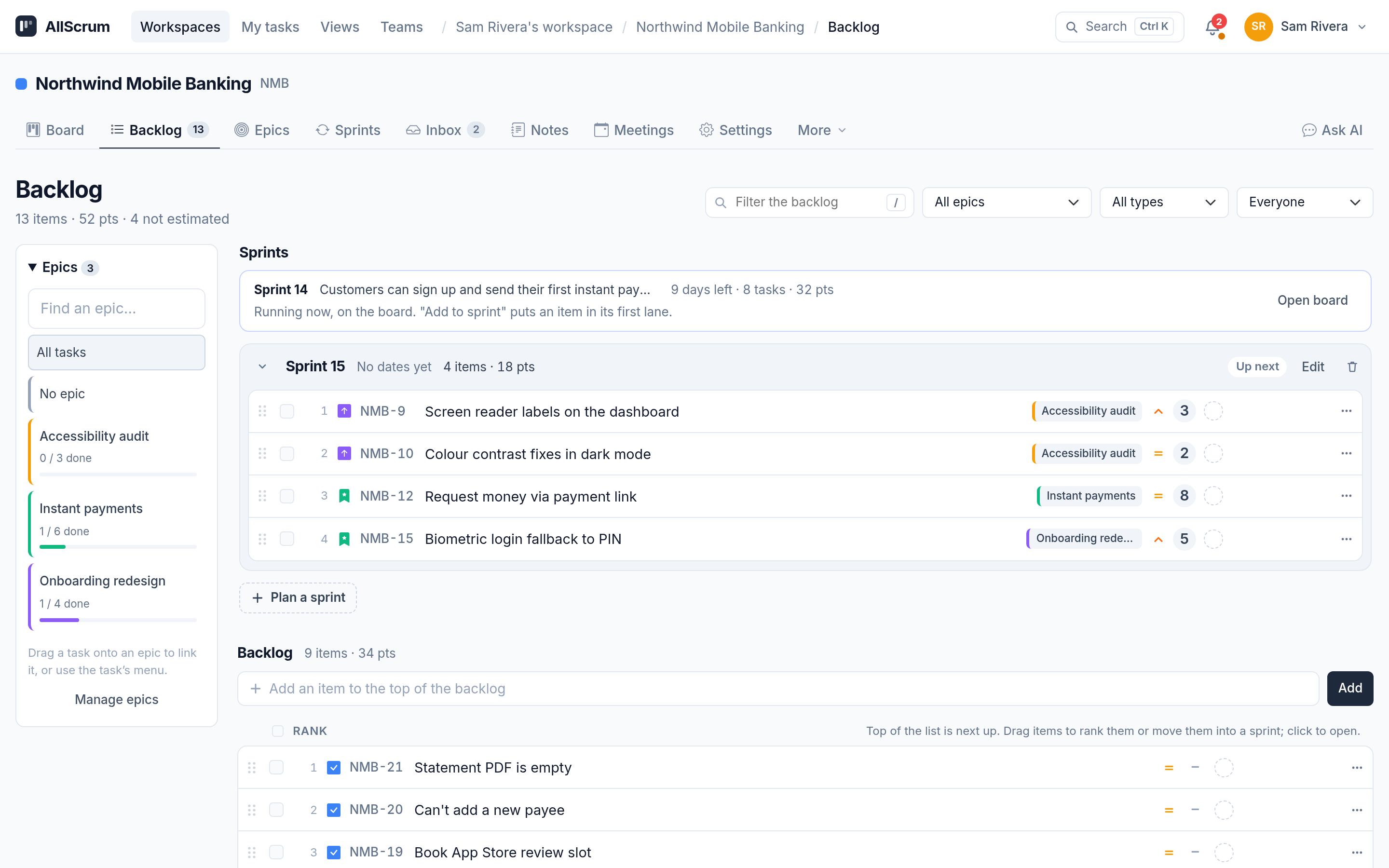
The team pulled items one by one, checking each against the sprint goal. They stopped at 32 points—right at capacity, with Lena's Friday off accounted for.
4. Split items that are too big
Sometimes a task at the top of the backlog is too large to fit in one sprint. The team discussed one of the Onboarding redesign epics that had a 13-point task. It was too big. They split it into smaller items that fit the sprint. The first two went into Sprint 14, and the third stayed in the backlog.
If a task can't be completed in a single sprint, it probably needs splitting.
5. Confirm the sprint plan
With items selected and the sprint goal agreed, the team checks that the set of tasks adds up to something coherent. Does every task directly support the goal? If not, reconsider.
The team committed to Sprint 14: 32 points, a clear goal, and a plan everyone understood. Sprint 15 was queued above the backlog with 4 items (18 points), so the next planning session will already have a head start.
Common mistakes and how to avoid them
Re-ranking during the meeting. If the backlog arrives unordered, the team spends the first 20 minutes deciding what's important. Rank the backlog before the meeting. If something genuinely needs reprioritizing—a new bug report, a change in priorities—discuss it, but as an exception, not as the default workflow.
Ignoring unfinished work. If the team didn't complete all Sprint 13 items, those should return to the backlog and be ranked alongside everything else. Don't automatically roll them into the next sprint without considering whether they are still the highest priority.
Committing to a sprint goal that's too vague. "Improve the app" isn't a sprint goal. "Users can reset their password without contacting support" is. Make the goal specific, measurable through the work, and clearly connected to the backlog items you selected.
Not checking for unestimated tasks. A task without story points is a wildcard. Flag unestimated items before the meeting so someone can size them, or leave them out of the sprint.
The role of the epic filter during planning
As the team pulls from the top of the backlog, they need to see how each task connects to the bigger picture. The epic filter shows all epics and their progress—how many tasks are done, how many points remain. This helps the team see which epics are close to completion and might be worth finishing in this sprint.
Tracking your plan as the sprint runs
Once the sprint starts, the team needs to see if they are on track. The Sprints tab shows the running sprint with a burndown chart and an ideal line. If the team falls behind, they can spot it early and adjust—by swarming on a blocker, dropping a task that isn't critical, or asking for help.
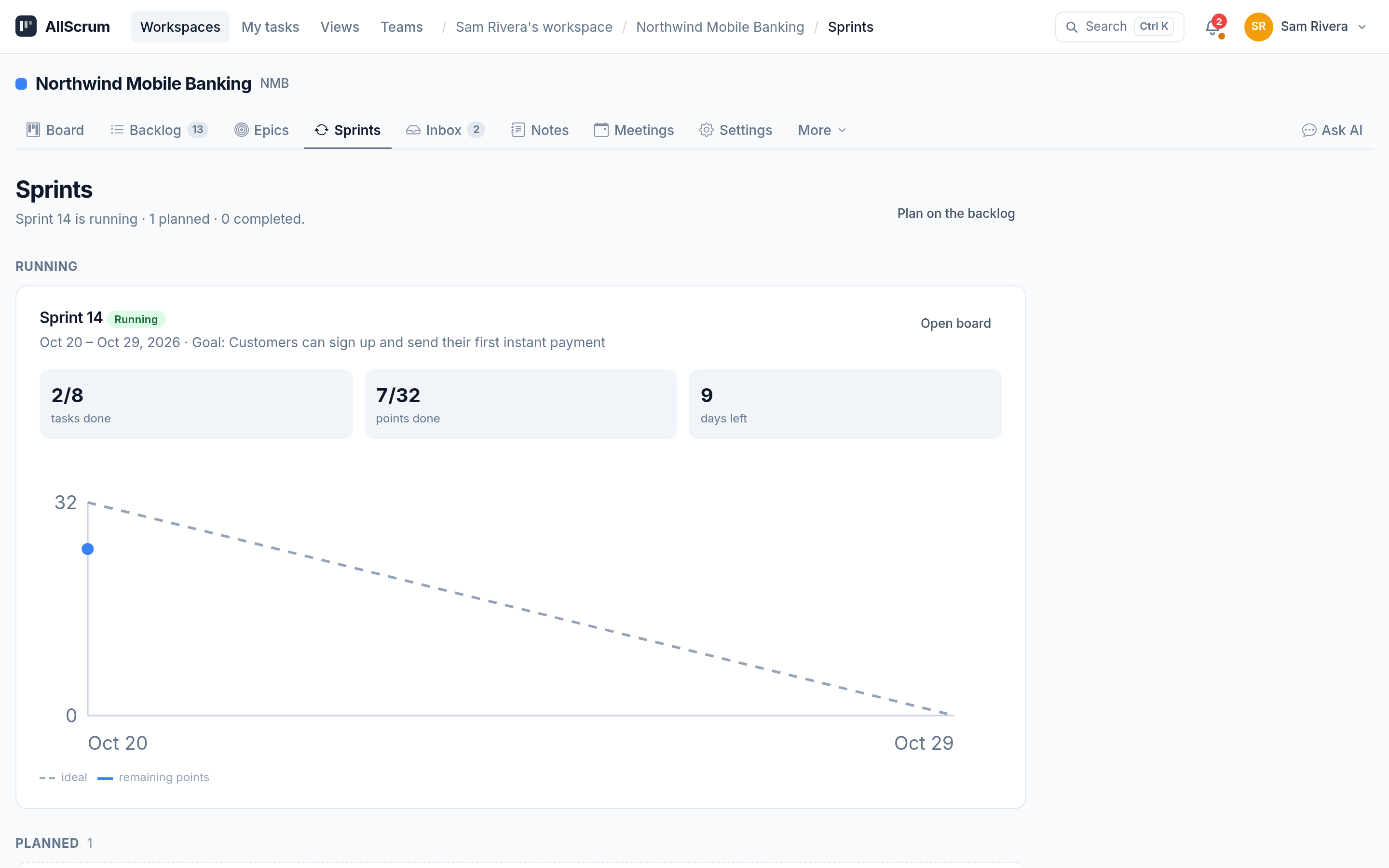
The burndown isn't a micromanagement tool. It's a signal. If the burndown is above the ideal line for three days running, the team needs a conversation. If it's on or below, keep going.
Capacity vs. velocity: the practical difference
Velocity is what the team measured over the last three sprints. Capacity is what the team can realistically do in the next sprint after accounting for absences, ceremonies, and unplanned work.
Northwind Mobile Banking's velocity was about 31 points. Their capacity for Sprint 14 was 32 points because Lena would miss only one day, and the work they planned was clear.
Don't add a buffer for unknowns. That's what velocity already accounts for (it's historical, not theoretical). If you start padding, you'll commit to less than you can do.
The pre-filled sprint: a time saver
When the backlog is ranked and the next sprint is pre-filled with top items, the planning meeting becomes a confirmation session. The team reviews the pre-filled sprint, adjusts if needed, and agrees on the goal.
In AllScrum, you can queue a sprint with items from the backlog before the planning meeting. The queued sprint appears above the backlog, and its items stay in the backlog lane until the sprint starts. This means the team isn't starting from a blank sprint during the meeting—they're reviewing a proposal prepared ahead of time.
When to re-rank during the sprint
Ranked backlogs aren't static. A new critical bug comes in, priorities shift, or a market change happens. That's fine. Re-rank when there's a reason, but do it outside the planning meeting unless the change directly affects what the team is about to commit to.
The ranking criteria should be transparent to everyone on the team. If the team understands why one item is above another, they trust the backlog and planning goes faster.
Checklist for sprint planning with a ranked backlog
When your backlog is ranked, sprint planning is about capacity and goal alignment, not priority debates. Start with a clean backlog, and the meeting practically runs itself. Get started free at allscrum.com.