
Meeting notes are supposed to capture decisions and drive action. In practice, they often become a graveyard of good intentions. You spend 45 minutes in a planning session, agree on a priority, and assign an owner. Someone types the notes into a shared doc. A week later, when a work item hasn't moved, you discover it was written in the notes but never entered the backlog.
The problem isn't your team. It's the gap between where notes live and where work lives. When your meeting notes and your task tracker are in different places, action items fall through.
The one-page structure for meeting notes
Before looking at tools, the structure of your notes matters. A Scrum team's meeting note doesn't need to be long. It needs to be findable and actionable. Here's a simple structure that works across any project:
Goal – one sentence: what this meeting was about. "Sprint 14 planning: commit to work for the next sprint."
Decisions – bullet points of what was agreed. Each decision should be a fact, not an opinion. "We'll keep the liveness check vendor for now."
Risks – things that might block the work. "App Store review could take 2–3 days."
Actions – tasks with an owner. Each action should be a single thing that someone can do. "Book App Store review slot – Sam."
This structure forces clarity. If something isn't a decision, a risk, or an action, it probably doesn't need to be in the notes. And if it's an action, it needs a home in your backlog.
Where notes and the backlog meet
The Northwind Mobile Banking team runs their Sprint 14 planning with all four members: Sam Rivera, Priya Shah, Tom de Vries and Lena Novak. Sam facilitates. The goal is to commit to 32 points for the sprint.
Their velocity for the last three sprints was 31, 34 and 29 – roughly 31 points on average. Lena is out on Friday, so they pull back slightly to 32 points. The notes capture this capacity decision.
The notes also record two key decisions: the liveness check vendor stays for now (revisit after Sprint 15), and the GBP currency bug goes first.
One risk emerges: the App Store review process could take two to three days, which might push their release.
Two actions come out of the meeting: "Ask compliance to sign off on the new ID check copy" and "Book App Store review slot." Both become tasks in the backlog.
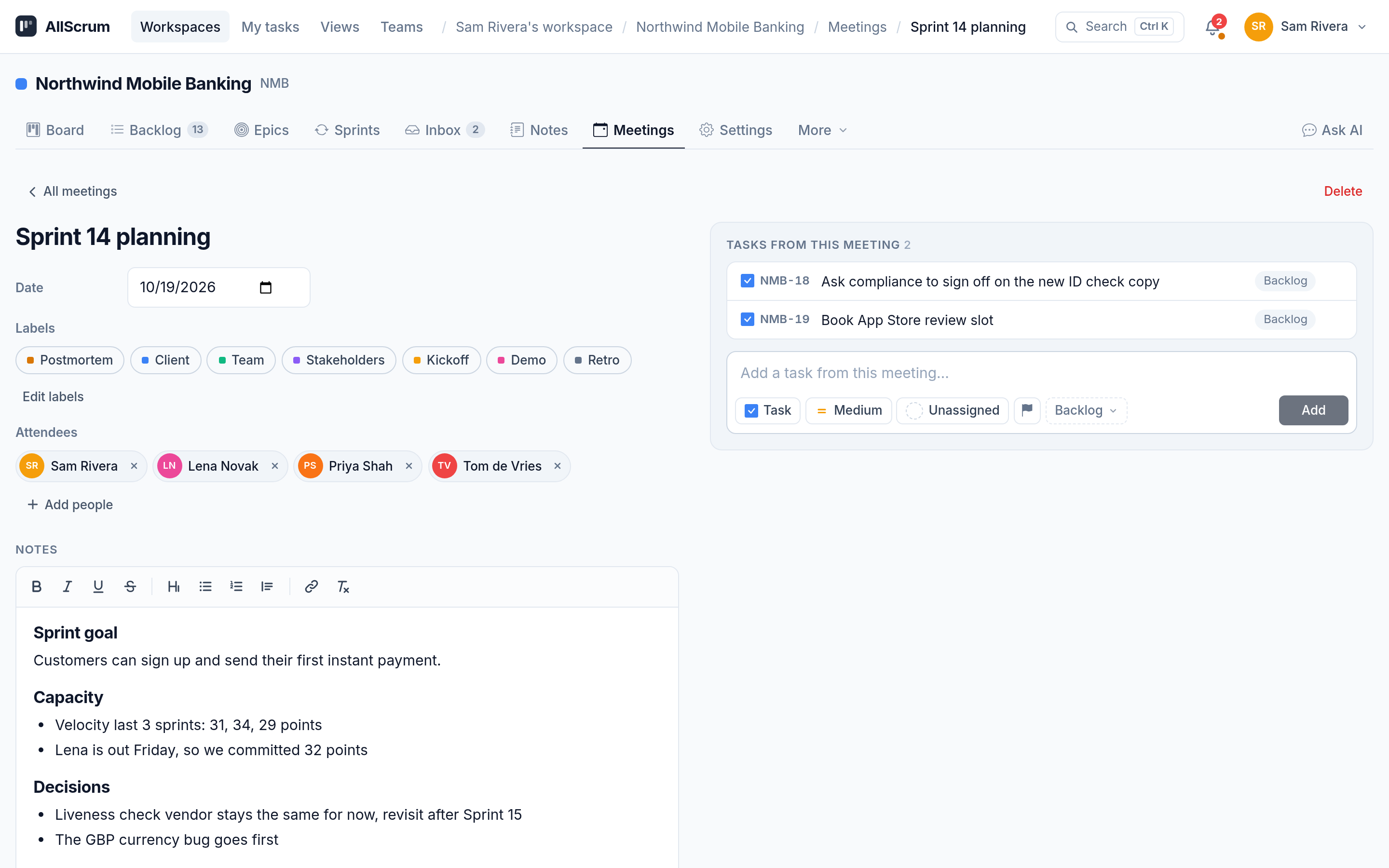
In AllScrum, notes and tasks aren't separate. The meeting notes page holds the full structure – goal, decisions, people, labels – and every task created during the meeting stays linked to it. You don't have to open a separate doc to remember why a task exists.
A meeting notes page that works
A project's Meetings tab lists every meeting: the postmortems, the retrospectives, the planning sessions. Each entry shows the date, the labels, the attendees and the tasks created from it. You can click into any meeting and see the full notes.
When you start a new meeting from the project, you set a date, add labels and note who attended. The notes field is rich text – you can format decisions, bold risks and keep everything readable.
The critical part comes when an action item surfaces. Instead of writing "Sam books the App Store slot" in notes and hoping someone remembers, you add a task straight from the meeting. You set which project lane it goes into – backlog, To Do, or a planned sprint. You pick its type, priority and assignee. That task is now in the project backlog with a direct link back to the meeting where it was created.
The meeting page shows a list of all tasks created in it. At a glance, everyone can see: "These are the actions we committed to."
This is common sense, but most tools separate notes from tasks. If your meeting notes are in a doc and your tasks are in a board, you're asking someone to find and re-enter every action. That's where things get lost.
The workspace-wide view
Teams work across multiple projects. A single week might include a sprint planning session, a client demo review and a compliance check-in. Each meeting belongs to a different project, but you need one place to see everything.
AllScrum's workspace-wide meetings overview lists every meeting across every project in the workspace. If you need to find a decision you raised three weeks ago, you can see all meetings from all projects in one place without clicking into each project.
This matters because decisions don't respect project boundaries. The workspace view helps you find decisions across projects without digging through each one individually.
How Northwind Mobile Banking used it
Let's walk through the example from the screenshot. The team holds Sprint 14 planning. The meeting page records:
- Goal: "Customers can sign up and send their first instant payment" (their sprint goal)
- Attendees: Sam, Priya, Tom, Lena
- Decisions: Keep the liveness check vendor; fix the GBP currency bug first
- Risk: App Store review (2–3 days)
Sam creates two tasks from this meeting: "Ask compliance to sign off on the new ID check copy" and "Book App Store review slot," both placed into the backlog.
Both tasks appear in the backlog, linked to the meeting. The team ends the meeting with confidence that no action was left in a doc. Every commitment is in the backlog.
Common mistakes to avoid
Too much detail in notes. If your notes read like a transcript, no one will read them. Keep decisions and risks short. The goal is clarity, not completeness.
Writing actions separately from tasks. If you write "Tom: fix GBP bug" in notes and later create a task for Tom, you've introduced a point where work can fall out of the system. Create the task while the action is being discussed.
No owner on actions. An action without a name is a suggestion. Every line in the actions section should have exactly one person.
Forgetting risk follow-ups. Risks are not tasks, but they often spawn tasks. The App Store review risk led to a task to book a slot. If a risk doesn't lead to anything, ask yourself why you're tracking it.
How AllScrum keeps it simple
Every project has a Meetings tab. Click into it to see the full history. Start a new meeting, fill in the notes, create tasks as you go. The tasks are linked back to the meeting. The meeting is linked forward to its tasks.
The meetings overview at the workspace level lists meetings from all projects. No sync. No copying notes into a second system. The note is the task's origin story, and the task is the note's proof that something got done.
Checklist for better meeting notes
Try it on your next planning session. Open a meeting, write the notes and create the tasks. One meeting, one place, zero lost actions.
Ready to stop re-discovering decisions? Start a free account at allscrum.com and turn your next meeting's notes into work that actually gets done.