
What Is an Epic in Scrum?
An epic is a large body of work that spans multiple sprints. It groups related tasks under a single goal. Think of an epic as a chapter in a book. Each chapter has its own arc and covers several scenes (stories), but it still belongs to the larger plot.
In AllScrum, epics live inside a single project. You give each epic a title, a description, a colour, and a status: Planned, In progress, or Done. Every task in the project can belong to at most one epic. The epic's progress — both task count and story points — reflects tasks and points in Done lanes, including archived tasks.
Epics solve a common problem: small teams lose sight of the bigger picture when they focus only on sprint-sized chunks. A sprint goal keeps you aligned for two weeks. An epic keeps you aligned for two months.
How Big Should an Epic Be?
There is no fixed rule, but a common guideline is one to three sprints. If an epic would stretch beyond three sprints, it is probably a theme — a collection of epics that together deliver a capability.
- Story: hours to a few days. The smallest unit of value.
- Epic: days to a few weeks. A meaningful outcome.
- Theme: months (multiple epics). A strategic initiative.
"Onboarding redesign" is an epic. It contains stories such as adding login options, rewriting screens, and adding guidance for new features. Together those stories probably fill two sprints. If you also planned to redesign account recovery, that could be a separate epic under the theme "Customer onboarding".
If your epic has too many tasks to track comfortably, consider splitting it. An epic that never seems to end becomes demoralising and harder to track.
Why Measure Progress in Points, Not Just Task Count
This is where many teams get it wrong. A task count says "6 of 12 tasks done — 50%". But what if those six tasks are trivial two-point chores, and the six remaining tasks are all eight-point problems? You are nowhere near halfway.
Story points reflect effort and complexity. They give a far more honest picture.
Worked Example: Northwind Mobile Banking
The Northwind Mobile Banking team is in Sprint 14. Their epic Instant payments is in progress. On the Epics tab, the team sees:
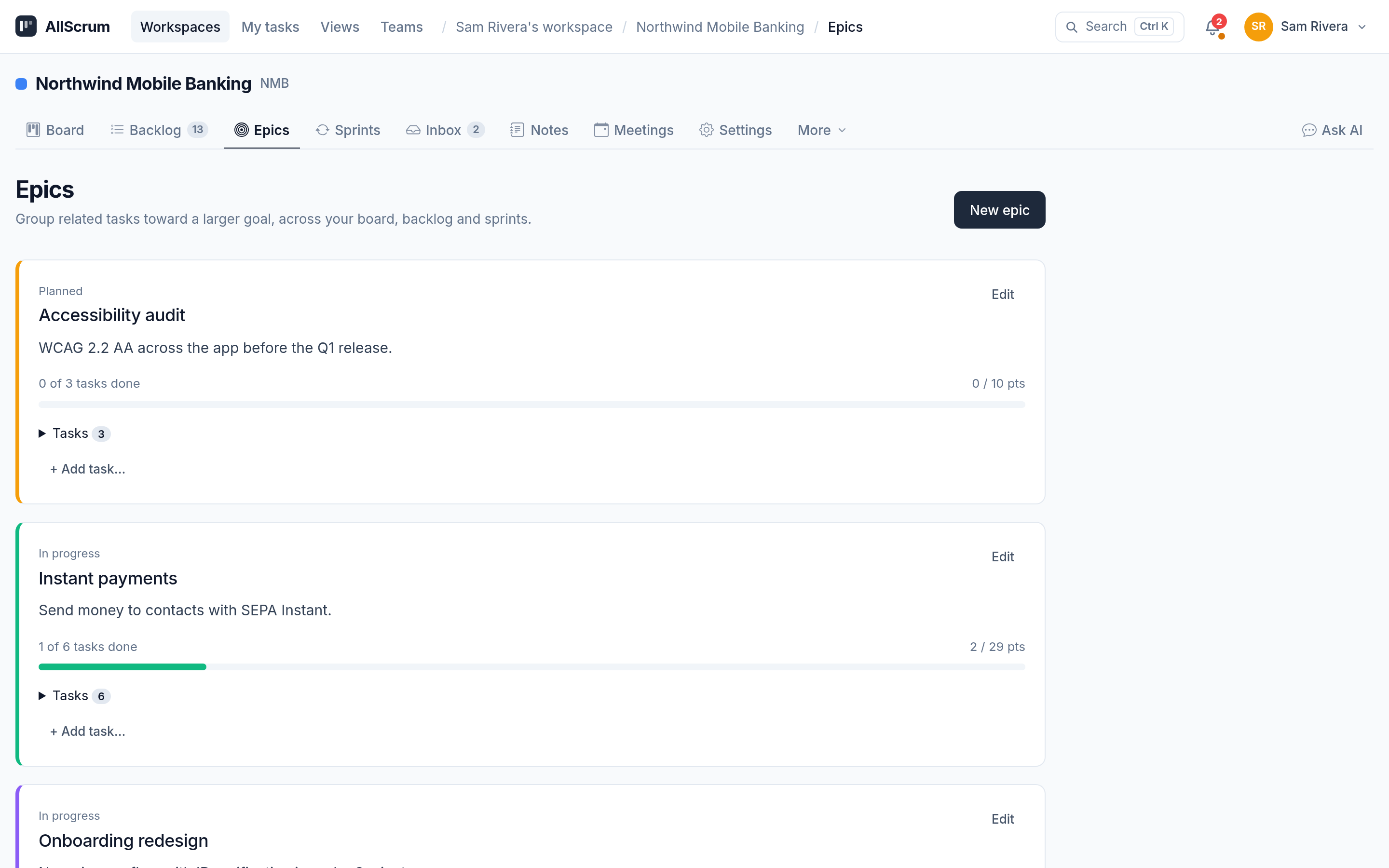
Instant payments shows:
- 1 of 6 tasks done
- 2 of 29 points done
If the team only looked at task count, they might think they were further along. But the points tell a different story — the remaining tasks cover the larger, more complex pieces. The hard work is still ahead.
Why does this matter? During sprint planning, teams can use epic progress to decide whether to move features to a later sprint or renegotiate scope with stakeholders. If the team relied only on the task count, they might pretend everything was on track until the last minute — a classic trap.
AllScrum counts points from tasks in lanes marked as Done, including tasks you have archived. That matters when you complete work in a sprint but later move it to an archive for clean-up. Your epic progress does not lose those points.
How to Use Epics Well
1. Create the Epic Before You Write Tasks
When you start planning a big feature, open the Epics tab and create the goal first. Give it a short, concrete name — "Accessibility audit" rather than "Make app compliant". Write a description that everyone can refer back to. In AllScrum, you can pick a colour that will appear as a small badge on every task card that belongs to that epic. The team will quickly learn that all purple badges are Accessibility, all green badges are Onboarding.
Set the status to Planned until you pull the first task into a sprint.
2. Link Tasks in the Backlog or on the Board
When you open a task's details, you will see an Epic field — but only if the project already has at least one epic. Click into it and pick the epic from the list.
Faster way: open the backlog. On the right, an Epic panel shows every epic in the project. You can drag any task from the backlog list directly onto an epic to link it. The coloured badge appears immediately. This is especially useful during backlog refinement, when you are sorting out which items belong to which initiative.
3. Filter by Epic to Stay Focused
In AllScrum, you can filter both the board and the backlog by epic. During Sprint 14, one team member might pull up only "Instant payments" cards to see exactly what is left. Without the filter, she would see everything — the To Do column includes tasks from Onboarding redesign too. The filter removes the noise.
4. Use Epic Status, but Don't Automate It
Epic status is set manually. Completing all its tasks does not automatically change the epic to Done. That is intentional. The epic might need sign-off, documentation, or a hand-off to another team before you call it finished. Set the status to Done when you, as a team, agree the goal is met.
If you delete an epic — maybe you deprioritised the initiative — all its tasks stay in the project and simply lose their epic link. Nothing is lost.
5. Revisit Epic Progress During Sprint Review
Sprint reviews can easily turn into a single-sprint retrospective. Add a quick check: "How is Onboarding redesign tracking against its total points?" If progress has stalled for two sprints, it is time to discuss whether the epic is still realistic or needs to be descoped.
Common Mistakes to Avoid
Creating epics that are too vague. "Improve performance" is not an epic. "Reduce cold start time below 2 seconds" is. A vague epic gives the team no boundary for what to include or exclude.
Splitting epics across projects. An epic belongs to one project. If you have work spread across two projects, consider whether they should be one project, or whether you need two separate epics that track independently.
Forgetting to update status. An epic that stays "Planned" for three sprints while the team clearly works on it confuses everyone. Move it to "In progress" as soon as you pull the first task.
Confusing the epic with the theme. Accessibility is a long-running effort. A single epic called "Accessibility audit" is fine — it covers the audit, fixes, and report. A larger effort like "Make every feature WCAG AA compliant" might be a theme with several epics.
Checklist for Using Epics in Scrum
AllScrum makes it easy to create, track, and filter epics across your team's sprints — start free at allscrum.com.