
What is a blameless incident postmortem?
An incident postmortem is a structured report written after a service disruption. It documents what happened, why it happened, and what the team will do to prevent it from happening again.
The word "blameless" is essential. A blameless postmortem focuses on conditions, decisions, and system design — not on who made a mistake. The goal is learning and improvement, not accountability. When teams know they won't be blamed for honest errors, they share more information and the whole organization gets better.
Why your team needs one
Without a postmortem process, incidents get forgotten. The same root cause can surface weeks or months later. A written postmortem:
- Captures the timeline while details are fresh
- Identifies contributing factors that aren't obvious in the moment
- Creates a permanent record for new team members
- Produces concrete follow-up tasks
- Builds a culture of continuous improvement
The template
A blameless postmortem has five core sections. Every section is optional — if you don't know the impact yet, leave it blank and fill it in later.
Summary
One or two sentences describing the incident. Include the service affected.
Impact
What happened to users and the business. Be specific about duration, user count, and data integrity.
Contributing factors
The conditions that made the incident possible. These are often process gaps, missing alerts, or design decisions. Never name individuals here.
Response and recovery
A timeline of what happened and who did what. Times should be in UTC to avoid timezone confusion. Each entry should describe an event, not evaluate it.
Prevention and follow-up
Specific action items the team agrees to complete. These should be small, concrete tasks that reduce the chance of a repeat incident.
How to keep it blameless
The most important rule: describe conditions and decisions, not people. Compare these two approaches:
- Blaming: "A config change was deployed without testing."
- Blameless: "A config change lowered the connection pool from 50 to 5. There was no review step for payment config changes."
The blameless version states facts without assigning fault. It also points to a fix: add a review step.
Other practices for a blameless process:
- Use passive voice for the report sections. "The config was changed" instead of "Tom changed the config."
- Let people remove their own timeline entries before publication.
- Discuss system design and process gaps in observations, not individual performance.
- Make the report editable by the whole team, not just one person.
Worked example: Payments delayed for 47 minutes
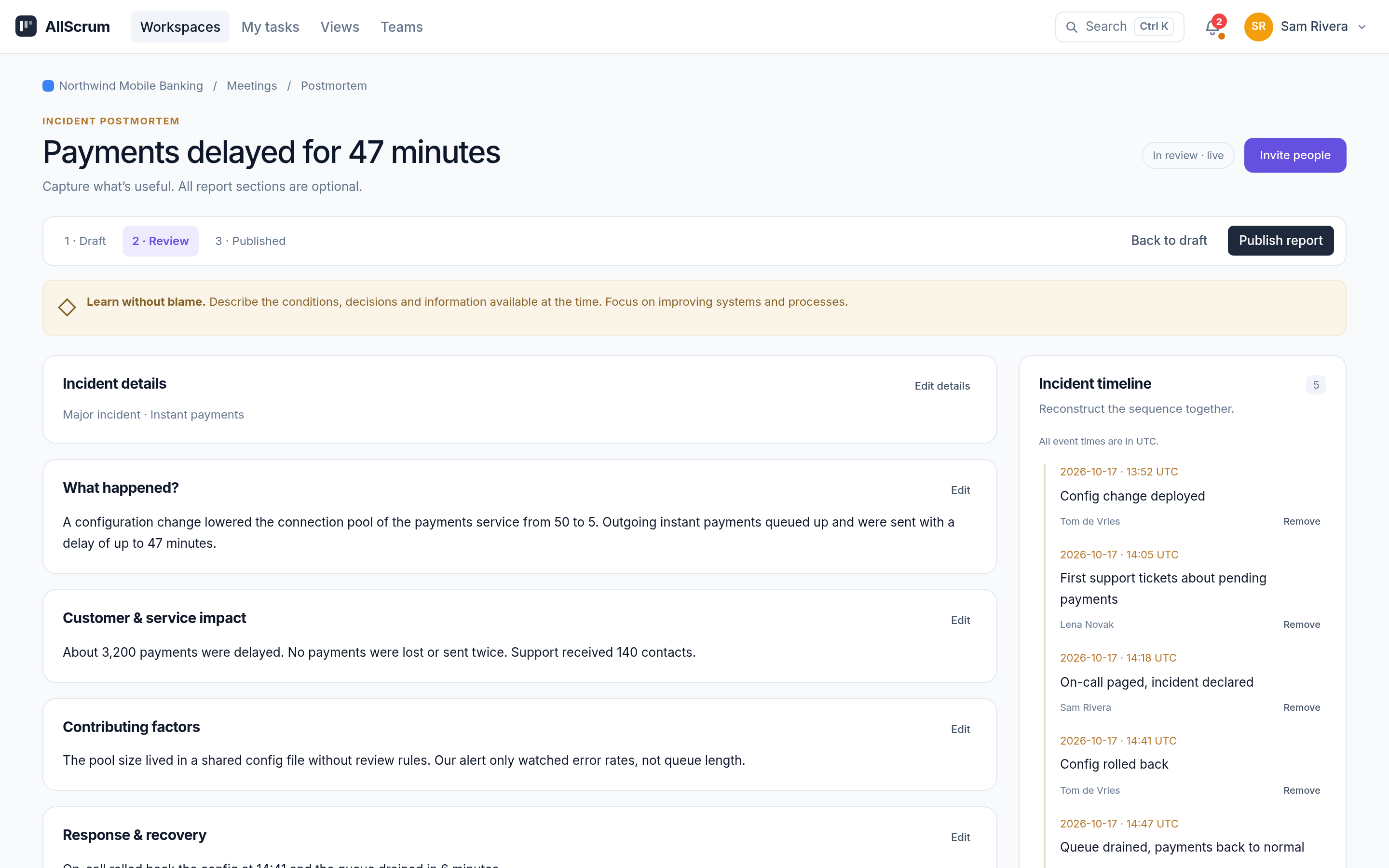
The Northwind Mobile Banking team had an incident where payments were delayed for up to 47 minutes. Here is their postmortem, which is in Review.
Summary
A configuration change reduced the payments service connection pool, causing payment processing to queue behind a bottleneck for 47 minutes.
Impact
- About 3,200 payments were delayed by up to 47 minutes
- No payments were lost or sent twice
- Support received 140 contacts from affected customers
Contributing factors
- The payments service configuration was changed without a review step
- There was no automated alert when the queue length exceeded normal levels
Response and recovery
| Time (UTC) | Event | Who |
|---|---|---|
| 13:52 | Config change deployed, connection pool reduced from 50 to 5 | Tom |
| 14:05 | First support tickets from customers | Lena |
| 14:18 | On-call paged and incident declared | Sam |
| 14:41 | Config rolled back to previous value | Tom |
| 14:47 | Queue drained and service returned to normal | Sam |
Prevention and follow-up
- Add a mandatory review step for any config change affecting payment processing
- Create an alert on queue length above 200
- Write a status page banner template so support can quickly communicate with customers during incidents
Observations
- Support had no template to tell customers what was going on during the incident
- The rollback was quick once the cause was known — the delay was in identifying the root cause, not in fixing it
How to create a postmortem in AllScrum
In AllScrum, you start a postmortem from the project's Meetings tab. Choose Start postmortem and enter the incident title, affected service, and severity. This creates a linked meeting with a Postmortem label and a dedicated report.
The postmortem has these built-in sections: summary, impact, contributing factors, response/recovery, and prevention/follow-up. Team members can edit individual sections, with version checks to prevent overwriting each other. All times in the incident timeline are explicitly UTC. Timeline events and observations can be attributed to a team member or a named guest.
The postmortem moves through three stages: Draft, Review, and Published. The creator and project owners/admins control the stage changes. Review can return to Draft. Publishing locks the report and appends it to the linked meeting. Action tasks stay editable and can remain open after publication.
You can invite guests — people outside your project — to contribute observations and timeline events. They can't edit the shared report or see action tasks. Guest access can be enabled, revoked, or reset at any time.
The follow-up tasks from the prevention section are linked to the meeting, so they're easy to find during sprint planning.
Common mistakes
Including names in the narrative version. Instead of "Sam declared the incident at 14:18," keep the person's name in the timeline and use passive voice in the narrative: "The incident was declared at 14:18."
Making every section mandatory. If you don't know the exact impact yet, leave it blank rather than guessing. Empty report sections are omitted from the saved meeting notes.
Skipping the blameless review. If your postmortem reads like an accusation, rewrite it. Focus on what conditions allowed the error.
Not following up on action items. A postmortem is only useful if the team completes the prevention tasks. Add them to your backlog.
Checklist before publishing
Try it with your team
Start your first blameless postmortem after your next incident. Use the template above, invite your team to collaborate, and publish the report once everyone has reviewed it. AllScrum's built-in postmortems handle the timeline, observations, and follow-up tasks for you. See the full documentation at /incident-postmortem.